
My workflow for new and existing websites, using ChatGPT, Google Search Console, Google Analytics and Screaming Frog
SEO work can become scattered quickly. I can be reviewing a crawl, finding content gaps and updating a page, then notice another issue before I have finished the first task.
I use a clear process to keep the research, decisions and implementation connected. In this article, I share how I manage SEO projects for new websites and existing sites with pages and blogs already published.
I explain when I use ChatGPT, Google Search Console, Google Analytics and Screaming Frog, how I include AI visibility, and how I check my work. I have also included downloadable checklists and templates to make the process easier to follow.
What is SEO project management?
SEO project management is how I organise the work needed to reach a website’s SEO goals. I define the scope, choose priorities, assign responsibilities and set deadlines. I also track dependencies, get the necessary approvals and check the work before marking it complete.
It gives me a clear record of what needs to happen, who owns each task and how I will check the outcome. Whether I am working on my own website or supporting an agency, I use that record to keep the project moving.
How I organise my SEO projects
My work on FixMySERPs brings technical SEO and content strategy together. I built the website in WordPress and Elementor, and my work includes reviewing crawl findings, analysing search performance, creating and updating pages, and checking changes on the live site. I have also built custom ChatGPT skills to review content against Google Search Console data.
My sequence is straightforward: understand the business, establish the starting position, investigate demand and the website, choose priorities, implement, verify and review. I record the decisions so I can explain why I made a change.
I adapt the checklists and review intervals to the project’s scope. The linked resources include an onboarding checklist, a project-brief template and an editable page-map workbook. I also share the ChatGPT prompts I use at each stage.
How I use my SEO tools
Each tool has a job:
- I use Google Search Console to investigate Google Search visibility and indexing.
- I use Google Analytics 4 to examine measured visits and business actions.
- I use Screaming Frog to inspect the website’s technical structure.
- I use Google Search to check intent and the pages competing for attention.
- I use ChatGPT to organise evidence, develop briefs and question my conclusions.
I bring actual data and page content into ChatGPT and specify the website, audience, date range, filters and questions I need answered. Without that context, a plausible recommendation can still be wrong for the project.
I return to the source report or live page to verify important findings. I also keep proposed automation separate from workflows I have actually tested. A generated plan still needs implementation and QA.
1. I start with the business and the scope
Before researching keywords, I identify what the business needs from the website. That could be enquiries for a particular service, bookings in a genuine service area, or sales of a product category. I want to understand what makes an enquiry valuable and whether the business can fulfil the demand.
I collect the information I need to understand the business:
- Priority services or products and the audience they serve.
- Locations and service areas.
- Customer questions and common objections.
- Competitors, seasonality and the sales process.
I ask which offers matter most commercially and what evidence supports the business’s claims.
I then define the project’s scope. I record what I will audit, write, implement and report on, who can make changes, who approves business facts and what depends on a developer. For a client project, I agree how approval and scope changes will be handled.
How I appled this to FixMySERPs
For FixMySERPs, my goal is to attract enquiries from agencies that need help delivering SEO work. Before researching keywords, I define:
- My audience: Agencies that need additional SEO support.
- My priority services: Technical SEO audits, content reviews and optimisation, content strategy, and AI visibility audits.
- My target markets: Agencies in the US, Canada, the UK and Europe that can work with a remote specialist.
- A valuable enquiry: An agency with a project or ongoing workload that matches my skills and capacity.
I then use my services page to define the scope of the work. I would check whether it clearly explains:
- What each service includes.
- What the agency will receive.
- Whether I can help implement the recommendations.
- How my support fits into the agency’s workflow.
- How to contact me about a project.
My project scope would cover reviewing the page’s content, checking its search intent and target queries, improving relevant internal links, and testing the contact journey and enquiry tracking.
That gives my keyword research a clear purpose: helping the right agencies find my services page and understand how I can support them.
Where ChatGPT fits
I use ChatGPT after collecting discovery notes. It helps turn scattered information into a brief, highlight contradictions and identify missing questions. I review the result before treating it as the project’s direction.
My prompt: “Turn these discovery notes into an SEO project brief. Include confirmed business goals, audience, priority services, locations, scope, dependencies and unanswered questions. Separate facts from assumptions. Do not invent targets, credentials or service details.”
I finish this stage with an agreed brief, access list and primary success measure. I set a numerical performance target only after reviewing the baseline and the resources available.
Toolkit: onboarding checklist and project-brief template.
2. I check tracking and establish the starting position
For an existing website, I record performance before making changes. I usually start with a useful period such as the last three months, compare it with an equivalent earlier period, and add a year-on-year view when history and seasonality justify it.
I note migrations, redesigns, tracking changes and campaigns that could affect the comparison.
For a new website, I test measurement before launch and establish the search baseline afterward. I record the launch date and any older domain or URLs being replaced. I do not treat missing historical data as evidence of poor performance.
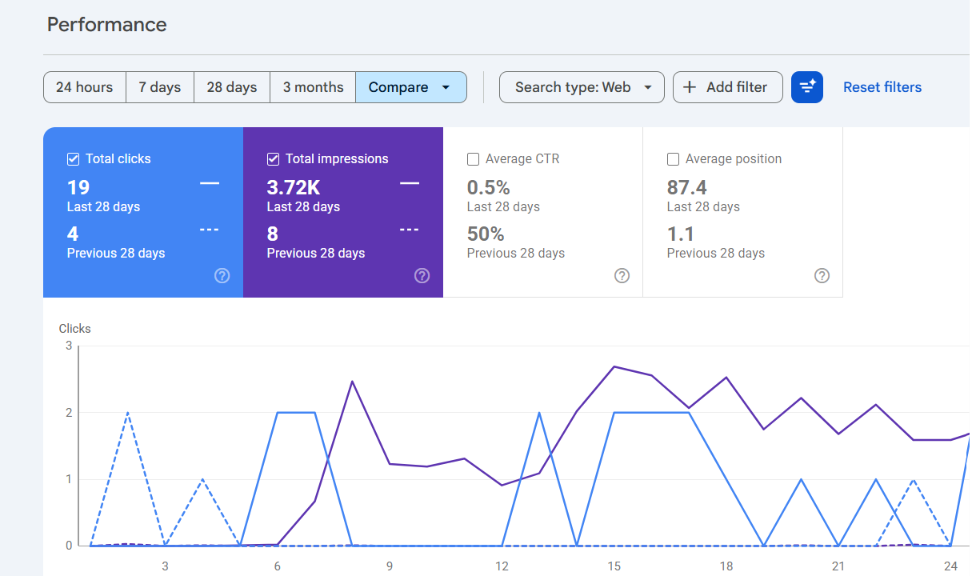
For example, the image below shows FixMySERPs’ performance over the last 28 days. This helps me track my progress and assess the results of my SEO efforts.
How I use GSC at the start
In the GSC Search results Performance report, I work through these checks:
- Select Web and set the comparison dates.
- Review clicks, impressions, CTR and average position.
- Use the Pages and Queries views to investigate important URLs.
- Apply country or device filters where relevant, and record them with the export.
I check which queries relate to the business goal, whether priority pages are gaining or losing visibility, and which pages may be attracting the wrong audience. I use position and CTR as clues for investigation. Their meaning depends on the query mix, search results and the page’s purpose.
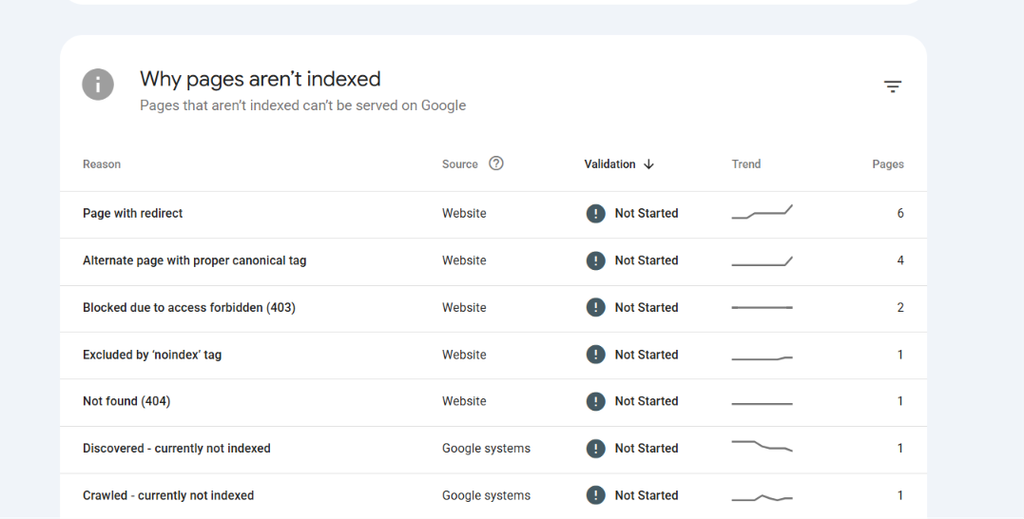
I also check indexing reports and inspect selected priority URLs. My question is whether the pages that matter can be discovered and indexed. An exclusion can be intentional, so I investigate its purpose before creating a fix.
How I use GA4 at the start
I test the main business action, such as a completed enquiry or purchase, and check that it is measured correctly. I use the relevant key event rather than assuming every interaction represents a lead. A phone click, for example, does not prove that a call was completed.
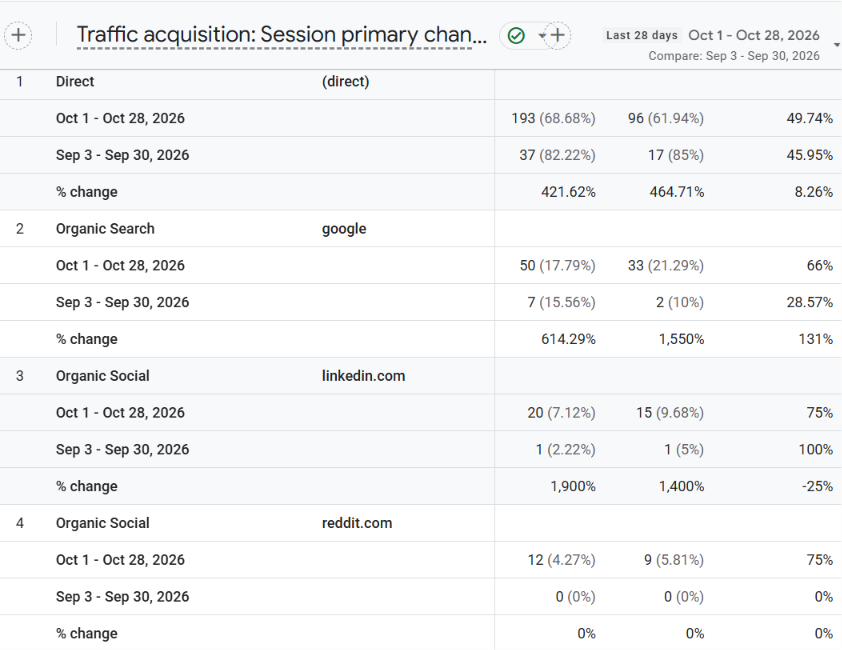
In GA4, I review organic landing-page performance and traffic sources. I can add Session source / medium to landing-page analysis, or inspect landing pages in Traffic acquisition. Report placement may vary with the property’s configuration and permissions.
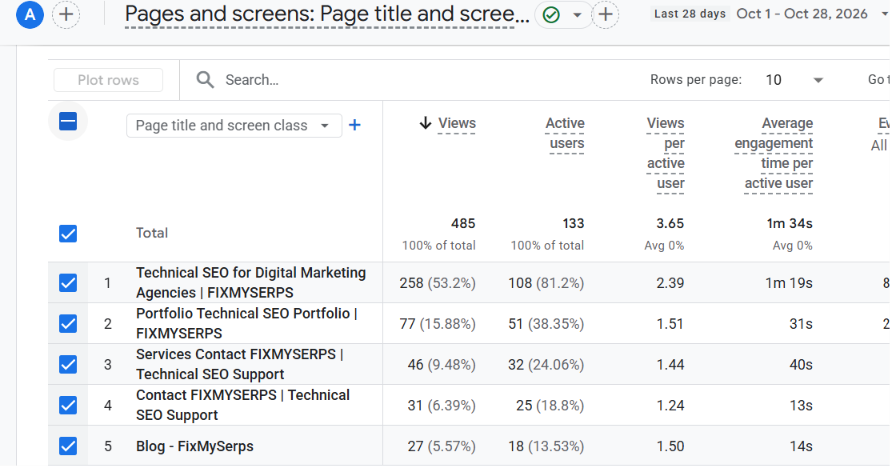
I keep Google organic traffic separate from all organic search when comparing with GSC. Clicks and sessions are different measures; consent, attribution and reporting differences also affect the totals. I explain those differences instead of trying to force a match.
I connect tracked enquiries with the business’s lead-quality information where available. More recorded events are useful only if I understand what they represent.
3. I research customer demand and live search results
I use several sources to understand what my audience searches for:
- Customer questions and common concerns.
- Keyword research and GSC queries.
- Live Google results.
- Autocomplete suggestions and related searches.
I prioritise topics that fit the business’s offer and audience rather than choosing keywords mainly for search volume.
I review search competitors alongside direct business competitors. I look at:
- Page type: Are service pages, blog posts or product categories ranking?
- Search intent: What does the searcher want to achieve?
- Content depth: How thoroughly does the page answer the query?
- Original evidence: Does it include examples, research or first-hand experience?
- Practical answers: Does it help the reader understand or solve the problem?
- Next action: What does it encourage the reader to do?
This helps me decide whether a query needs a blog post, service page or product category.
My next step depends on the website:
- For an existing site: I review the page already covering the topic and decide whether to improve it before proposing another URL.
- For a new site: I use the research to plan the initial site structure and decide which pages to create first.
4. For a new website, I plan the core pages before expanding content
I start with the pages that explain the business and support a useful customer action. For a service website, these usually include:
- The homepage.
- Core service pages.
- About or team information.
- Contact or booking pages.
- Relevant proof, such as genuine case studies.
I map the navigation and relationships between those pages before writing a long blog calendar. A supporting article should answer a worthwhile question and connect naturally to the relevant service or product.
I prepare a brief for each priority page. It covers the audience, intent, service facts, questions to answer, evidence required, internal links and conversion action. I confirm those facts with the appropriate owner.
How I approach the build
My WordPress and Elementor work includes creating and updating pages using established layouts, adding headings, titles, meta descriptions and internal links, and checking formatting and responsive display. I treat those implementation checks as part of the SEO work.
Before launch, I check:
- Crawlable navigation and the URL structure.
- Canonical tags and the sitemap.
- Mobile display and important page templates.
- Public pages for any remaining staging restrictions.
- Forms or checkout and analytics on the live environment.
If the build replaces an older site, I map important old URLs to suitable new destinations. I test redirects and update internal links. I avoid sending unrelated retired pages to the homepage.
After launch, I submit the sitemap, inspect representative priority URLs and monitor for problems. A request to index a URL does not guarantee inclusion. I also check that expected customer actions still work after the launch changes.
Stage output: a completed launch checklist, including checks on the live website.
5. For an existing website, I audit the pages and blogs already published
I begin with an inventory. I combine Screaming Frog findings with GSC, analytics and CMS or sitemap records so the review includes pages a crawl may miss. Where available, I add relevant backlink information.
I record each URL’s page type, purpose, indexability, canonical, search performance, measured business value and proposed action. I want one working record that connects technical findings with content decisions.
What I investigate with Screaming Frog
In Screaming Frog, I review:
- Status codes, redirects and broken links.
- Titles and headings.
- Canonicals and indexability.
- Internal linking, duplication and site architecture.
- Important pages that are difficult to reach.
Depending on the project, I also review performance, structured data and server-side problems with the appropriate tools or developer.
I validate important findings with the live page and search data. A crawl warning needs a practical explanation: which URLs are affected, whether the behaviour is intentional, and what problem it creates for users or search engines.
How I decide what happens to each URL
I keep a page when it remains accurate, useful and distinct. I refresh it when the purpose is sound but the information, evidence, structure or next action needs work.
I consider merging pages when they substantially serve the same need and consolidation would create a better destination. I choose that destination using relevance, useful content, performance, links and business purpose. I then combine valuable material, redirect retired URLs appropriately and update internal links.
I retarget a page when it has a useful separate role but its current focus overlaps another page. I consider removal only after checking links, conversions, seasonality, business value and how long the page has had to perform.
Low traffic alone does not justify deleting a blog. Multiple URLs appearing for a query also do not automatically prove harmful cannibalisation. I document the reason for each decision.
Stage output: a URL inventory with evidence, proposed actions and review notes.
6. I turn the audit into a manageable action plan
I prioritise failures that stop customers taking action or prevent important pages being accessed and indexed. Then I address valuable recovery opportunities, weak commercial pages, relevant content gaps and wider growth work.
For each task, I record:
- The evidence and affected URLs.
- The expected outcome.
- The owner and any dependencies.
- The acceptance check.
“Improve internal links” becomes a specific task: add relevant links from named articles to a priority service page, then verify that the links work and make sense in context.
I use a small active task list so the project keeps moving. As a starting rule, I select up to three substantial outcomes for the week and put new ideas in the backlog. The number can change with the team’s capacity.
How I use ChatGPT to challenge priorities
My prompt: “Review these verified findings against the project goal. Suggest priorities using business value, evidence, effort and dependencies. Explain the reasoning and missing evidence. For each task, give an acceptance check. Distinguish observed problems from possible causes and do not predict a percentage traffic gain. Findings: [insert].”
I review the suggestions against what I can actually implement. A recommendation that depends on unavailable development support needs a dependency and a realistic delivery plan.
Stage output: a prioritised task list and a dated change log.
7. I refresh existing content using GSC, the page and the SERPs
This is where my use of ChatGPT becomes more specific. I have built custom skills to review content against GSC data, so the conversation can focus on what the page is actually appearing for and what a reader still needs.
I collect the page content, its query data for the chosen period, business context and relevant search-result observations. I compare these before deciding whether to change the title, expand a section, improve a service explanation or give the page a different focus.
If a page is losing clicks, I investigate the cause first. Demand changes, indexing problems, site changes, ranking losses and measurement differences need different responses. A rewrite is useful only when content is part of the problem.
My content-refresh prompt
“Review this page against the attached GSC data, business facts and SERP observations. Identify relevant questions it does not answer, useful material to preserve, outdated claims and intent mismatches. Suggest focused changes and internal links from the supplied URL list. Flag unsupported claims and missing evidence. Do not assume every impression needs a new page.”
I check the recommendations myself and involve a subject expert where the claims require it. I do not publish invented quotations, customer results, credentials or first-hand experience.
A practical example
Suppose a service page appears for cost-related searches but gives little explanation of what affects the price. I first confirm that this question belongs on the page and gather approved pricing information. I may add a clear section covering cost factors, inclusions and circumstances that require a quote.
If the subject needs a dedicated guide, I give that guide its own useful purpose and link it to the service page. I record what changed, verify the live page, and review the relevant queries and measured outcomes later. This is an illustrative example, not a reported client result.
Stage output: a focused refresh brief with approved changes and completion checks.
8. I create new content to fill a defined gap
I commission a new page when research identifies a distinct need that the site does not already satisfy. I give each piece a business purpose, reader, intent and place in the site structure.
My content brief includes:
- The main question, related concerns and outline.
- The evidence needed to support the content.
- Internal links and the CTA.
- The writer, reviewer and review date.
For a refresh, I also record the existing material to preserve and the reason for the update.
ChatGPT helps me develop an outline and assess a draft. I supply approved facts and ask it to flag gaps rather than fill them with guesses. I review for natural language, repetition, vague introductions and claims that sound stronger than the evidence.
I check headings, titles and meta descriptions alongside the actual page content. I avoid writing for an arbitrary keyword count or word count. The page needs enough detail to do its job.
How I keep the calendar useful
I prefer one content tracker with a live URL and workflow stage, so I do not manually repeat the same work across several calendars. If I need a weekly or monthly view, I filter the same record or build an overview from it.
I keep content briefs, ownership and production status in the same content plan. My task log holds implementation details; the content plan remains the source for editorial status.
Stage output: a content plan, page briefs and editorial quality checks.
9. I build AI visibility into the SEO work
I consider whether a business can be found, understood and represented accurately in AI-generated answers. I distinguish a brand mention, a citation to its website, an identifiable referral and a qualified enquiry. Each tells me something different.
I check access and business information
I check that important content is accessible and easy to find through internal links. I also keep business names, services, locations, contact information and team details accurate across the website and relevant profiles.
For Google AI Overviews and AI Mode, a supporting page must be indexed and eligible to appear in Search with a snippet. Google does not require a special AI text file or special schema for these features. I check the normal search requirements before considering extra AI-specific work.
How I use Yoast to set this up
1. Set the website and business identity
In Yoast SEO → Settings, I review:
- Site basics: Check the website name and any alternative name.
- Site representation: Select whether the website represents an organisation or a person.
- Business details: Add the correct organisation name, logo and relevant profile links.
For FixMySERPs, I use the organisation settings and keep the details consistent with the information on my website.
2. Check that important pages can appear in search
I open each priority page and expand Advanced in the Yoast panel. I check that “Allow search engines to show this content in search results?” is set to Yes.
I also review the settings under Yoast SEO → Settings → Content types so that pages and posts intended for search are not accidentally set to noindex. These settings allow indexing, but they do not guarantee that Google will index the page.
3. Review the XML sitemap
I check that XML sitemaps are enabled under Yoast SEO → Settings → Site features. I open the sitemap and check that the important, indexable pages are included.
I then submit the sitemap URL in Google Search Console and use URL Inspection to investigate priority pages that are not indexed.
4. Check the structured data
Yoast generates structured data using the website identity and page settings. I check that the organisation details and page types describe the visible content accurately. I do not add schema types simply because I hope they will attract AI citations.
5. Review crawler restrictions separately
If I use Yoast Premium’s bot-blocking settings, I review which bots are blocked before making changes. Blocking GPTBot’s training access is a different decision from allowing OAI-SearchBot to access content for ChatGPT search.
I ask the owner or developer to check robots.txt, security plugins, firewalls and hosting restrictions. Yoast settings alone cannot confirm that a crawler can access the website, and allowing access does not guarantee a citation.
I treat any FixMySERPs AI information page as factual reference material. It supports clear business information alongside my services and About pages; it cannot instruct an external model to recommend my business.
10. I improve the answers and evidence
I review each priority page to check whether it answers the questions someone would ask before making an enquiry or buying.
1. Identify unanswered questions
I use customer questions, GSC queries and live search results to find what the page still needs to explain. I check whether a reader can understand:
- What the service includes.
- Who it is suitable for.
- What affects the price.
- What the process involves.
- What they will receive.
- Any limitations or requirements.
- How to take the next step.
2. Make the answers specific
I replace vague statements with details that help someone make a decision. Depending on the page, I add:
- A direct answer beneath the relevant heading.
- Practical steps and expected deliverables.
- Pricing context, including what changes the cost.
- Comparisons based on clear criteria.
- Examples that explain how the service works.
For FixMySERPs, I would check whether my services page explains what an agency receives after a technical SEO audit, whether implementation is included and what access I need.
3. Support claims with evidence
I check which statements need proof and add relevant evidence where available:
- Genuine case studies with the starting point, work completed and results.
- Screenshots with dates, context and permission to publish.
- First-hand examples or sample deliverables.
- Accurate qualifications and author information.
- Reliable sources for factual claims.
- Genuine reviews used with permission where required.
I label each example clearly so readers can distinguish an illustration from a reported result.
4. Choose whether to update or create
- For a new website: I use the core pages planned earlier and add the business information and evidence needed to support their claims.
- For an existing website: I use the page-map decision to place the improved answers on the most suitable existing or planned page.
I also review relevant professional listings, genuine reviews and opportunities to earn mentions through useful contributions or published work.
5. Record the changes and review the outcome
I record these updates in the same change log as the other SEO work. I review search performance and measured enquiries alongside the AI observations below, without assuming that one edit caused a change.
How I monitor AI visibility
I use a small, repeatable set of questions based on the audience and services. I record the exact prompt, platform or model shown, whether web search was used, test date and relevant market or session context. I keep the test conditions as consistent as possible.
For each check, I record whether the business is mentioned, whether its website is cited, which URL is cited and whether the answer describes the business accurately. I repeat the same questions at an agreed interval and retain the results, including checks with no mention.
I review identifiable AI referral visits and measured enquiries in GA4 separately. Referral data does not capture every AI interaction, and GSC query data does not identify ChatGPT referrals. Prompt checks are a sample of changing answers, not a complete visibility score or proof that an edit caused a citation.
10. I adapt the process for local and product-led businesses
For a local business, I include eligible Google Business Profiles, accurate categories and details, genuine reviews, useful location content and the enquiry journey. I avoid creating near-identical pages for places where the business has no meaningful service information to offer.
For ecommerce, I add category architecture, product availability, filters, duplicate URL handling and product or feed accuracy to the review. For multilingual or international sites, I agree the intended markets and check language/region implementation with the developer.
These additions follow the business model. I do not expand a small service-site audit into every possible SEO discipline unless the project requires it.
11. I verify implementation before closing a task
For page changes, I check:
- The live wording, headings and metadata.
- Internal links, images and the CTA.
- The responsive layout.
- Indexability and canonical settings where they could have changed.
For technical work, I ask for evidence against the acceptance check and inspect the affected URLs or templates myself. A developer’s completed ticket is the point to verify the fix.
I test tracking again when a release changes forms, checkout or templates. I log the date and exact scope so a later report can distinguish changes that were proposed from changes that actually went live.
12. I review performance on a consistent schedule
I use weekly reviews to spot urgent problems, resolve blockers and select the next tasks. Monthly reviews give me room to assess the broader pattern and decide what to change next. I adjust the interval when a launch, migration or incident needs closer monitoring.
I compare appropriate periods and relevant pages or query groups. I consider seasonality, query mix and other releases before explaining a change. I allow longer observation where traffic is low and avoid promising results by an arbitrary review date.
My report covers:
- The business outcome and search performance.
- Work completed, with live URLs.
- AI visibility observations.
- Unresolved issues and next priorities.
I distinguish measured results from possible explanations.
13. I close the project with a usable handover
I define completion against the agreed deliverables: a launch, an audit with implementation, a content programme or another scoped package. Ongoing SEO still needs ownership after that package ends.
Before handover, I confirm the work is live, priority journeys have been checked and outstanding tasks have owners. I provide:
- The strategy and page map.
- Content decisions and redirect records where relevant.
- Measurement notes and the change log.
- The next priorities.
I also document who maintains access, tracking, technical checks and content reviews. The handover should let the next person understand both what changed and why.
Stage output: an agreed handover record with files, responsibilities and outstanding tasks.
My first 90 days: a planning example
Days 1–15: I complete discovery, access checks, tracking validation and research. On an existing site, I establish the baseline and inventory. On a new site, I begin the architecture and core-page briefs.
Days 16–30: I confirm the strategy and priorities. I start urgent fixes and the first refresh batch for an existing site, or move core content and templates through review for a new build.
Days 31–60: I implement, verify and expand the agreed work. A new site launches when its checks pass. An existing site progresses through content and technical batches. I establish or repeat the AI prompt benchmark.
Days 61–90: I review completed work and available performance evidence, address regressions and plan the next quarter. Larger builds can take longer, and a new website may still have limited data. This is a planning sequence, not a ranking timetable.
The routine that keeps the work connected
At the start of a week, I ask what outcome matters most, what evidence supports the next task and what could block delivery. Before closing the task, I check what changed on the live site. At review time, I compare the available results with the original reason for doing the work.
That gives me a practical way to use my tools without letting the tools set the agenda. I can explain the next action, finish it, and return to the evidence before deciding what comes next.